

OCR vs. Intelligent Document Processing: What’s the Difference?
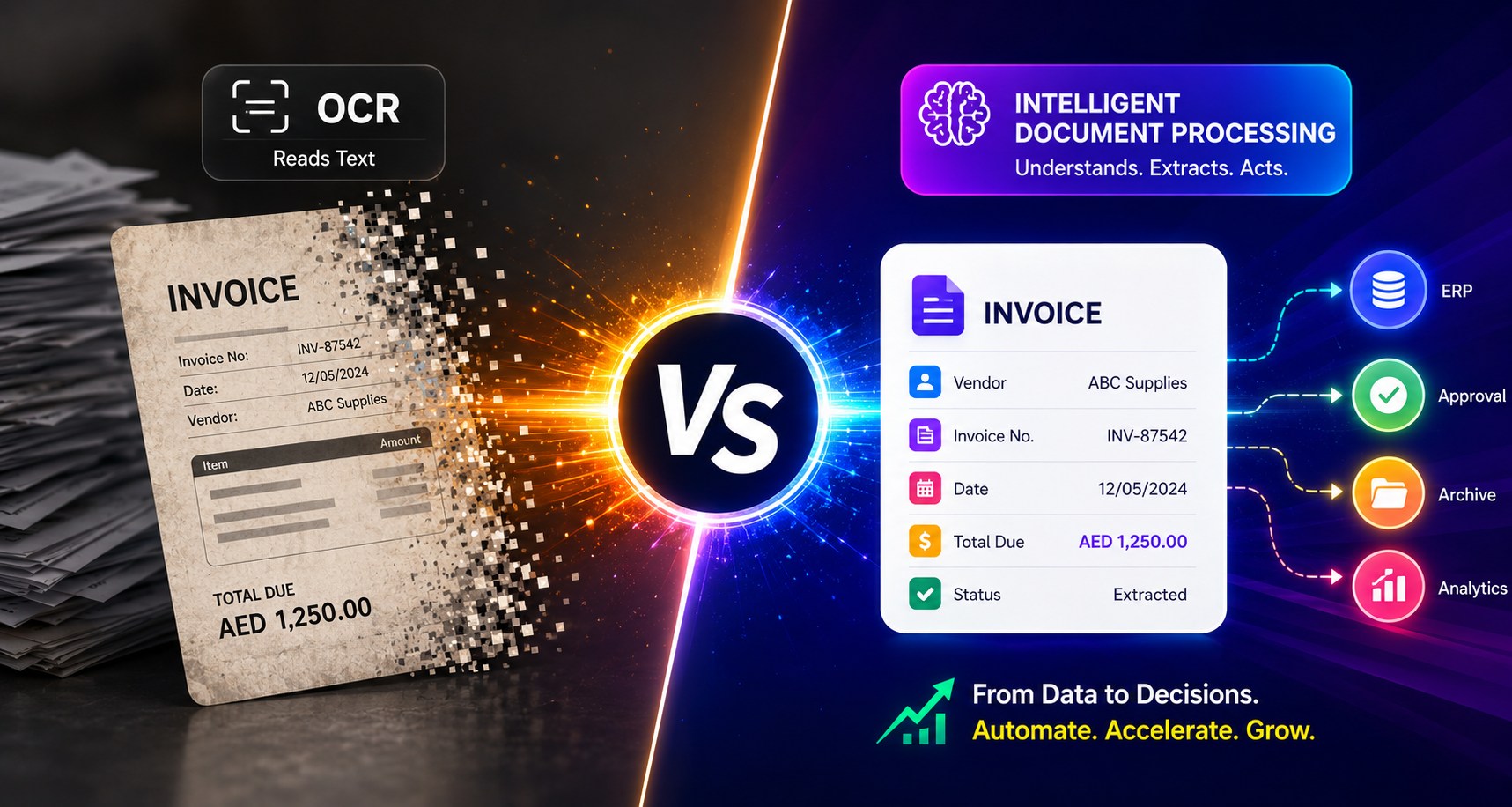
If you've ever scanned an invoice and hoped software would "just read it," you've probably run into two very different technologies: OCR and intelligent document processing.
They sound similar. They are not the same thing.
And picking the wrong one is one of the fastest ways to end up with a document automation project that half-works and frustrates everyone who touches it.
This guide breaks down OCR vs. intelligent document processing, what each one actually does, and which one your business needs if you're serious about business process automation in the UAE.
What Is OCR, Really?
OCR stands for Optical Character Recognition.
At its core, it's a technology that scans an image or PDF and converts the text into machine-readable characters.
That's it. That's the whole job.
Think of OCR as a very fast, very literal reader.
Feed it a scanned contract, and it'll tell you which words are on the page. It doesn't inherently know what a contract is. It doesn't know that "Total Due" sits above a number that matters, or that the date at the top is different from the due date at the bottom.
It sees text and turns that text into something software can search, copy, store, and process.
OCR has been around for decades, and it's genuinely good at what it does. OCR technology powers everything from scanned document archives to license plate recognition systems.
But the moment you need software to understand a document rather than simply transcribe it, plain OCR starts to run out of road.
What Is Intelligent Document Processing?
Intelligent Document Processing (IDP) picks up where basic OCR stops.
An IDP system can use OCR or other document-understanding technologies to extract content from a document, but then it adds additional layers of intelligence such as machine learning, natural language processing, computer vision, and increasingly, large language models.
Instead of simply producing a wall of text, an IDP system can determine:
This is an invoice.
This is the vendor name.
This is the invoice number.
This is the amount owed.
This is the due date.
These are the line items.
This field has low confidence and needs human review.
It can also classify documents, extract specific fields, validate information against business rules, and route documents into downstream workflows.
This is the real difference between intelligent document processing vs. OCR:
OCR reads. IDP reads, understands, classifies, and helps trigger action.
OCR vs. Intelligent Document Processing: A Side-by-Side Look
| Capability | OCR | Intelligent Document Processing |
|---|---|---|
| Core job | Converts images into machine-readable text | Extracts, classifies, validates, and structures document data |
| Context understanding | Limited | Uses AI to understand document context and relationships |
| Document classification | Usually requires additional logic | Can automatically classify document types |
| Handles varied layouts | Can struggle without templates or additional processing | Designed to handle varied layouts using AI models |
| Learns from feedback | Not inherently | Can incorporate feedback and improve models/workflows |
| Output | Raw or extracted text | Structured, usable data such as fields, values, and categories |
| Workflow automation | Requires additional systems | Can feed data directly into automated workflows |
| Human review | Often required for downstream validation | Can route low-confidence or exception cases for review |
| Best for | Text digitization and search | End-to-end document automation |
The table makes the distinction look simple, and honestly, it kind of is once you see it laid out.
OCR is a technology or component. IDP is a broader document-processing system.
Most modern intelligent document processing solutions can use OCR or text extraction as one part of a much larger pipeline.
Why This Distinction Actually Matters
Here's where a lot of businesses trip up.
They buy "OCR software" expecting it to automate their invoice processing, HR onboarding paperwork, or trade documentation.
Then they wonder why someone still has to manually check every field.
OCR was never designed to solve all of those problems by itself.
It's designed to digitize text.
If your documents are simple, consistent, and always formatted the same way, plain OCR might genuinely be enough. Digitizing a fixed-format form, for instance, may not require a full document intelligence system.
But most real business documents aren't that neat.
Invoices come from hundreds of different vendors, each with their own layout. Purchase orders change format when a new supplier joins. Contracts can have important clauses in completely different places depending on who drafted them.
That's where document automation needs more than OCR.
It needs a system that can classify documents, identify relevant information, extract structured data, validate it, and route it to the next step.
That's exactly the gap intelligent document processing is designed to close.
There's also a cost angle that gets overlooked.
Manual data entry isn't just slow. It's expensive in ways that don't always show up on a single invoice but add up quickly across a year.
Every retyped field is a chance for a typo, a missed decimal point, a wrong date, or a duplicate payment.
Multiply that across thousands of documents a month, and the "cheaper" option of skipping document intelligence can start looking a lot less cheap.
AI Document Processing and Business Process Automation: What UAE Businesses Are Adopting
The UAE has been moving quickly on digital transformation, and document-heavy industries are feeling the pressure to keep up.
Banks, logistics companies, real estate firms, trading businesses, and government-adjacent organizations process significant volumes of documentation every day.
Many of these workflows also involve documents in Arabic and English, along with PDFs, scans, forms, emails, and other digital formats.
AI document processing isn't just about speed, although speed matters when you're handling customs paperwork, financial documents, or time-sensitive business processes.
It's also about accuracy, consistency, compliance, and reducing repetitive manual work.
Here are a few areas where intelligent document processing can create value for UAE businesses:
Trade and Logistics
Bills of lading, customs declarations, shipping documents, invoices, and manifests can be extracted and validated automatically instead of being manually re-entered.
Banking and Finance
KYC documents, bank statements, financial records, and loan applications can be classified and processed faster while supporting compliance and verification workflows.
Real Estate
Title deeds, tenancy contracts, property documents, and other records can be extracted and routed into property management or internal systems.
HR and Government Services
Documents such as Emirates ID copies, visa documents, employee records, and onboarding paperwork can be extracted, verified against predefined rules, and organized without someone manually re-keying every field.
None of this comes from basic OCR alone.
The value comes from adding a layer of intelligence that can recognize what type of document it's looking at, which information matters, how that information should be structured, and when something needs human attention.
Business Process Automation UAE Companies Actually Need
Document automation is rarely the end goal on its own.
It's usually one piece of a broader push toward business process automation: fewer manual handoffs, faster turnaround times, and fewer errors slipping through because someone was rushing at 5 PM on a Thursday.
When intelligent document processing is connected to a broader automation strategy, it stops being "a tool that reads documents" and becomes the entry point for entire workflows.
Imagine a supplier invoice arriving by email.
An automated workflow could:
Capture the invoice.
Extract the vendor, invoice number, dates, totals, and line items.
Validate the extracted information.
Match the invoice against a purchase order.
Route exceptions to the appropriate employee.
Send invoices above a certain value for approval.
Push approved data into the accounting system.
Store the processed document for future reference.
The goal isn't to replace people.
It's to remove the repetitive, error-prone parts of their jobs so employees can focus on decisions and exceptions that actually require human judgment.
That's the real value of document automation.
When Do You Actually Need IDP Instead of OCR?
Not every business needs a full IDP setup.
Here's a quick gut check.
Stick With OCR If:
Your documents follow one fixed template.
You primarily need searchable, digitized text.
Document volume is relatively low.
Document formats rarely change.
You don't need complex validation or workflow automation.
Move to Intelligent Document Processing If:
You're processing documents from multiple sources or formats.
Documents arrive with different layouts.
You need structured data rather than just extracted text.
You need to connect document data to other business systems.
Accuracy and compliance matter.
Manual review is consuming significant employee time.
You want to automate a workflow rather than simply digitize a file.
If you read that second list and nodded more than twice, OCR alone probably isn't going to cut it.
You likely need the layer of intelligence that sits on top of text extraction.
It's also worth saying that this isn't an all-or-nothing choice.
Many businesses can start with OCR for basic digitization and introduce intelligent document processing as document volume grows, formats become more complex, or automation requirements increase.
The two aren't rivals.
IDP builds on capabilities such as OCR rather than simply replacing them.
Getting It Right Depends on the Documents, Not Just the Tool
A generic, off-the-shelf IDP tool can only get you so far.
The real gains come from matching the system to the actual documents a business handles, the formats they arrive in, the rules that need to be applied, and the software the processed information needs to feed into.
For one company, that might look like a pipeline that reads incoming invoices and syncs them directly into the accounting system.
For another, it could be a routing layer that automatically sends flagged documents to the right person instead of letting them sit in an inbox.
For a business dealing with unusual or inconsistent document types, it might involve computer vision and custom extraction logic designed around the specific documents that generic tools struggle with.
This is the kind of practical, document-specific problem Oglas AI helps businesses solve across the UAE.
The difference between a document automation project that actually works and one that simply adds another tool to the pile is often the same:
The system is built around how the business already works, rather than forcing the business to work around the system.
Final Thoughts
OCR and intelligent document processing solve different problems, even though they're often lumped together.
OCR turns images into text. Intelligent document processing turns documents into structured information that can drive workflows and decisions.
If your business is still manually checking and retyping data from PDFs and scans, that's often a sign that you've moved beyond simple document digitization and may benefit from AI document processing.
For UAE businesses pushing toward real business process automation, the next step isn't necessarily "more AI."
It's using the right intelligence in the right part of the workflow.
When documents can be captured, understood, validated, and routed automatically, a document-heavy process can go from a pile of manual tasks to a workflow that largely runs itself.
FAQs
What is the difference between OCR and intelligent document processing?
OCR converts scanned text or images into machine-readable text. Intelligent document processing goes further by using AI and document-understanding techniques to classify documents, extract structured data, validate information, and support automated workflows.
Is intelligent document processing the same as AI document processing?
The terms are often used interchangeably, although they can have slightly different meanings depending on the vendor or context. In general, AI document processing refers to using AI techniques to extract, understand, classify, and process information from documents. Intelligent document processing is commonly used for the same broader concept.
Can OCR alone automate business workflows?
OCR alone is usually not enough for end-to-end workflow automation. It extracts text, but additional logic is typically needed to understand document types, validate information, make decisions, and trigger actions across business systems.
Why are UAE businesses adopting intelligent document processing?
UAE businesses across sectors such as finance, logistics, real estate, trade, and HR handle large volumes of documents and administrative workflows. Intelligent document processing can help reduce manual data entry, improve processing speed, support validation, and connect document data to broader business processes.
What industries in the UAE benefit most from AI document processing?
Banking, finance, logistics, real estate, trading, HR, and other document-heavy industries can benefit significantly because they often deal with high document volumes, varied formats, repetitive data entry, and compliance-sensitive information.
Does intelligent document processing replace human staff?
No. A well-designed IDP workflow is intended to reduce repetitive data-entry and document-processing work. It can also route uncertain or low-confidence cases to people for review, allowing employees to focus on decisions and exceptions.
How does document automation fit into business process automation?
Document automation can serve as an important entry point into broader business process automation. Once information has been extracted and structured, it can trigger approvals, notifications, database updates, ERP actions, and other workflow steps.
Is intelligent document processing expensive to implement?
The cost depends on factors such as document volume, document complexity, required accuracy, integrations, and workflow requirements. For businesses processing documents at scale, the potential return can come from reduced manual effort, fewer errors, faster processing, and more consistent workflows.


